




I approached Wispr Flow as a practical productivity tool rather than a novelty voice app. Its job is simple to describe but more demanding to get right: I speak naturally, and it turns that speech into text I can use inside other apps. In everyday work, that can remove a surprising amount of typing, especially when I already know what I want to say and my hands are busy.
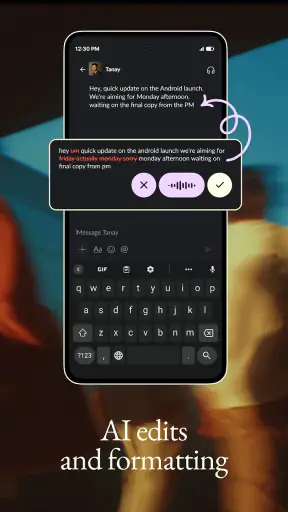
What makes the app interesting is the promise of receiving clean, ready-to-send writing instead of a rough transcript that needs heavy repair. That distinction matters. Dictation is useful only when correcting the result does not take nearly as long as typing from the beginning. My overall impression is that Wispr Flow is aimed at people who want voice input to feel like a normal writing method, not an occasional accessibility shortcut.
How Wispr Flow fits into daily productivity
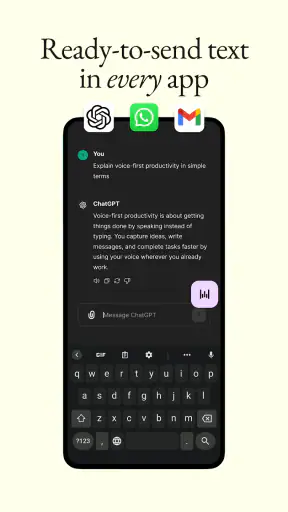
Wispr AI, Inc. positions this free productivity app around voice-to-text use across apps. That broad approach is more useful than a voice recorder with a separate transcription screen because it keeps the spoken input close to the place where I actually need the words. A quick message, a note, a task description, or a longer draft can all begin with the same habit: place the cursor, speak, and review.
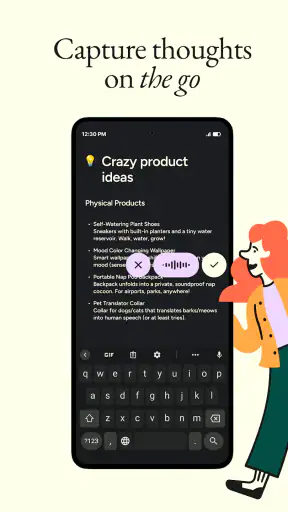
I found the biggest benefit in moments when typing felt inconvenient rather than impossible. Walking between tasks, holding a phone with one hand, or trying to capture an idea before it disappears are all situations where speaking has a natural advantage. It is also helpful for people who think faster out loud and tend to produce better first drafts through conversation than through slow keyboard entry.
The app is not a replacement for every keyboard interaction. I still need to tap the correct field, start the voice input, check names and numbers, and make final edits. Voice is also a poor fit for places where speaking aloud would be distracting or uncomfortable. The important question is not whether it eliminates typing, but whether it reduces the amount of typing and correction in the situations that matter to me.
The current experience and its strongest use cases
For short messages, the workflow is especially easy to understand. I can say what I mean in a conversational order, then look over the result before sending it. This is valuable when a message needs a little context and punctuation but is not important enough to justify composing it slowly. The practical advantage is speed without forcing me to write in clipped commands.
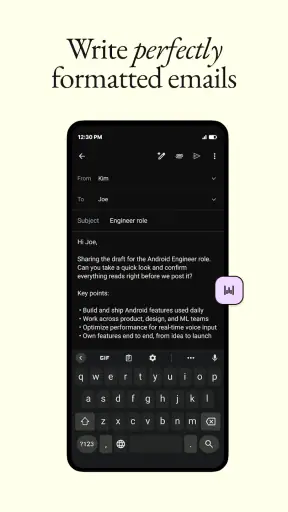
Longer writing brings a different benefit. I can speak a rough outline, explain the point I want to make, and then return to the text for structure. That makes Wispr Flow more useful as a drafting tool than as a perfect final-copy machine. I would use it for a personal note, a project update, a list of ideas, or the first version of an email, then edit with the same care I would give any draft.
A realistic example is a commute or a busy morning at home. I might remember three things that need to go into a work message: what changed, what I need from someone, and when I will follow up. Instead of trying to hold those details until I can type, I can dictate the thought in one pass. Once the text appears, I can remove repetition and check the names before sending. That workflow saves mental effort as well as keystrokes.
Another less obvious use is capturing decisions immediately after a meeting or call. I can speak a short summary while the details are still fresh, separating facts from follow-up actions in my own words. The result is not automatically a polished meeting record, and I would not treat it as one. Still, it can be a much better starting point than trusting memory later in the day.
What the latest version means for existing users
The current version is 2.2.4, and the app was released on February 13, 2026. Those details place this review around a relatively early stage of the product’s public life rather than after years of mature iteration. I would therefore judge it by how well its central voice-writing workflow works today, not by assuming that every edge case has already been solved.
For someone already using an earlier release, a version number alone does not tell me which individual behavior changed, so I would avoid promising a particular improvement that is not documented here. What I can say is that the current release is the one new users should evaluate: its usefulness depends on the present interaction between speaking, text insertion, and editing, not on what the app may have felt like at launch.
This also affects expectations. A newer release can make the experience smoother without changing the basic habit required from the user. I still need to speak clearly enough for the intended meaning, watch the generated text, and correct details that carry consequences. The app’s evolution should be measured by whether it reduces friction in that loop, rather than by whether it makes review unnecessary.
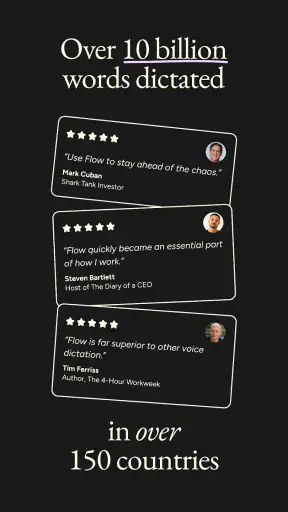
The current reception is encouraging. Wispr Flow has an average rating of 4.9 from around 5,100 ratings, with roughly 689 written reviews and over one million installs. Those figures suggest that the central idea is resonating with a substantial audience, although they do not guarantee that it will suit every accent, environment, writing style, or phone setup. I treat the response as a reason to try it, not as a substitute for testing it with my own messages.
Three workflows that reveal its real value
My first recommendation is to create a personal speaking pattern for messages. I would say the purpose first, then the key detail, then the requested action. For example, I might explain that a delivery is delayed, give the new expected timing, and ask whether the recipient wants an alternative. This structure produces a more usable draft than speaking disconnected fragments, and it makes the final review faster.
A second useful technique is to dictate in passes rather than chasing perfection in one take. I can first speak the complete thought, then add a short correction or missing detail afterward. This is often faster than stopping every few words to reformulate a sentence. It also reflects how people naturally think: the first pass captures meaning, while the second pass handles precision.
The third workflow is to use voice for composition and the keyboard for verification. I would reserve special attention for proper names, addresses, dates, amounts, technical terms, and anything that could create a real-world mistake. This is a crucial trade-off. The app can accelerate the production of text, but the responsibility for sending accurate text remains with me.
These workflows show why “voice-to-text” is not the whole story. The value comes from the handoff between speech and editing. If I speak in a way that gives the app a coherent sentence, use it where the cursor is already positioned, and perform a deliberate final check, the result feels like a genuine productivity shortcut. If I dictate without reviewing, the same shortcut can become a source of avoidable errors.
Where it compares well with ordinary alternatives
The usual alternative is the phone keyboard. A keyboard remains better when I am in a quiet place, need exact control over punctuation, or am entering sensitive information that I do not want to say aloud. It is also the more dependable choice for small corrections, code-like text, unusual spellings, and precise formatting. Wispr Flow earns its place when the first draft matters more than perfect character-by-character control.
Built-in device dictation is another obvious comparison. Basic dictation may be enough for a short search or a simple message, especially if I already like the keyboard’s microphone feature. Wispr Flow is more compelling when I want a dedicated voice-writing habit that extends across the apps I use and aims to produce cleaner text. The difference is less about speaking into a microphone and more about how much editing remains afterward.
Manual note-taking can still be better for private reflection, diagrams, checklists with many nested items, or situations where I need to see the structure while creating it. A voice-first workflow can become a stream of words that I later have to organize. I would choose Wispr Flow for capturing an idea quickly, then use the destination app’s own tools to arrange the result.
Finally, a full transcription service is a better fit when the goal is to process a long recording, preserve a conversation, or work from audio after the fact. Wispr Flow is designed around immediate text entry, not around treating audio as an archive. That distinction helps me choose the right tool instead of expecting one app to handle every kind of speech.
Limitations that deserve attention
The first limitation is the need for a review habit. “Clean” text is not the same as infallible text. A sentence can look polished while still containing the wrong name, word, or number. I would be comfortable using the app for low-risk drafts without overthinking every line, but I would slow down before sending anything involving commitments, payments, addresses, or professional details.
Privacy and social context are also part of the decision, even when voice input is convenient. I may not want to speak a personal message in a shared office, on public transport, or around other people. In those situations, the keyboard is not merely a backup; it is the more appropriate tool. Anyone considering this app should think about where they will actually use voice, not only how fast it might be.
Another trade-off is editing style. People who enjoy carefully choosing every word as they type may find dictation less satisfying, because spoken language often arrives with a different rhythm from written language. I can improve the result by speaking in complete thoughts, but I still need to reshape some sentences. The app helps me get words onto the screen; it does not replace my judgment as an editor.
It is also not the right choice for someone who wants a silent, keyboard-centered productivity system. If I spend most of my time entering short codes, correcting individual characters, or working in places where speaking is impractical, the benefit becomes smaller. The free price removes a financial barrier, but it does not remove these workflow limitations.
Who should install it, and who should skip it
I think Wispr Flow is a strong candidate for people who regularly postpone messages because typing feels slow, users who capture ideas while moving between tasks, and writers who prefer to produce a rough spoken draft before editing. It is particularly appealing if I already move between several apps and want voice input to follow the writing rather than remain trapped in a separate recorder.
I would also recommend trying it to anyone who has found ordinary dictation too rough to become a daily habit. The key test is simple: dictate a few messages in the way you normally speak, then count how much correction is needed. If the text is close enough that a quick review completes the job, the app has practical value. If every sentence needs rebuilding, the convenience may not justify changing habits.
I would skip it, or at least keep it secondary, if I rarely speak aloud, need highly exact formatting, or handle text where a small transcription error could have serious consequences. People who primarily want recorded audio, searchable long-form transcripts, or advanced document layout should look for tools built specifically around those jobs instead.
What I would watch as the product develops
Because the app is still at an early point in its release history, I would watch how consistently the core experience holds up across different writing situations. The most meaningful progress would be less correction, smoother movement between apps, and better handling of the awkward phrases people use when they are thinking aloud. Those are the details that determine whether voice input becomes a habit or remains an occasional experiment.
I would also pay attention to how existing users respond to updates over time. A strong early rating is useful evidence that the current concept works for many people, but long-term value depends on dependable everyday behavior. For me, the important question is whether the app continues to make drafting faster without encouraging careless sending.
At no cost and with an Everyone age rating, Wispr Flow is easy to test without committing money or adopting it as my only input method. I would begin with low-stakes notes and messages, learn which environments suit voice, and keep the keyboard ready for private or precision-heavy work. That gradual approach gives a more honest result than judging it from one impressive demonstration.
My final view is positive but practical. Wispr Flow does not make typing obsolete, and it should not be treated as an automatic proofreader. Its real strength is giving me a fast first draft directly where I want to use it, while leaving enough control for a final human check. If that matches the way you work, the best reason to try it is not novelty but a better capture-and-edit routine. If you need silent, exact, or archival transcription, a different tool will likely serve you better.


